What a construction change order is
A change order is a written, signed amendment to a contract you already have. It records work that was added or removed after the customer signed, what that does to the price, and what it does to the schedule. The original contract stays as it was signed. The change order sits on top of it, and the two together are the agreement.
Change orders come from three places: the customer asks for something different, you find something nobody could see when you quoted (rotted decking under the shingles, a panel that will not pass inspection, a pipe that is not where the drawings said), or a material or code requirement forces a substitution. Whichever it is, the rule is the same: write it down and get it signed before you do the work. The change you did on a handshake is the change you argue about at final payment.
For architect-administered commercial jobs, the industry uses formal forms such as AIA G701 or ConsensusDocs 202. This template is for the other ninety percent of the trades: residential and light-commercial jobs where it is you, the customer, and a signed estimate.
Change order vs estimate, quote, and bid
An estimate, a quote, and a bid are all prices you give before the customer signs. A change order is what you use after. If you are still pricing the job, start from the free contractor estimate template; for what each one should include, see how to write an estimate.
What is on the template
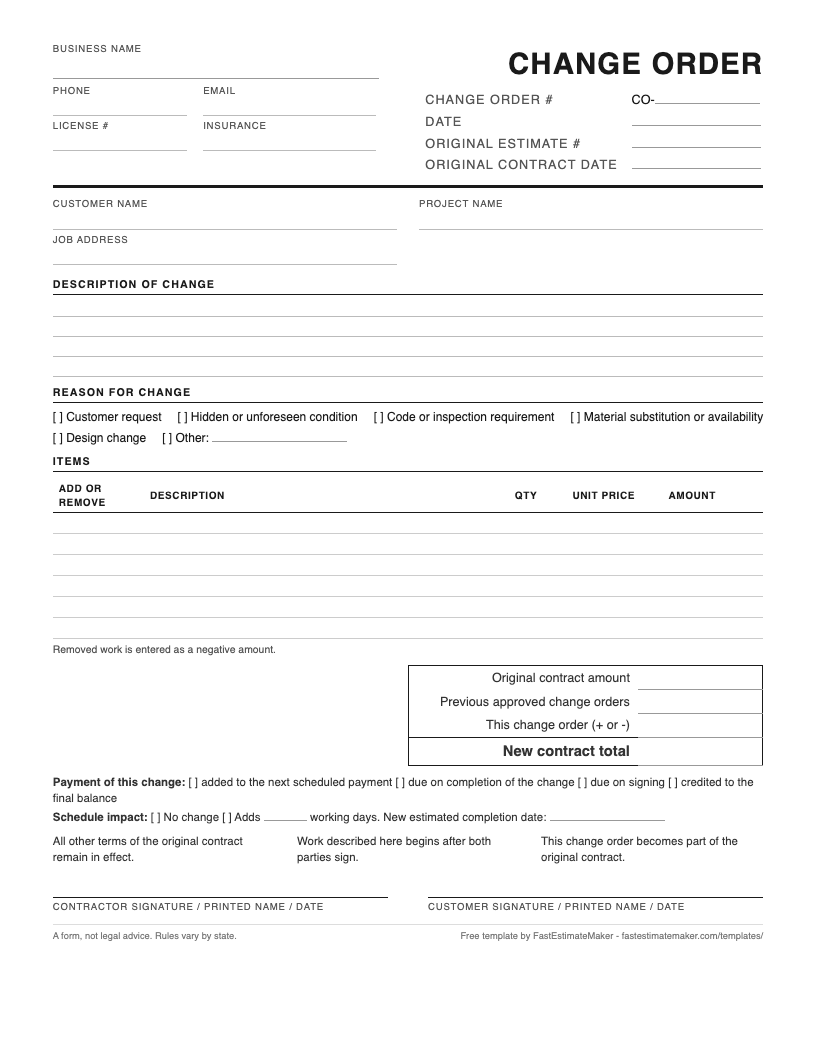
- Change order number and the original contract it amends. Number every change for the job, CO-1, CO-2, CO-3, and name the estimate or contract it changes. An unnumbered change order is easy to lose and easy to dispute.
- Description and reason. Plain words for what changes, plus a tick box for why: customer request, hidden condition, code requirement, material substitution, design change. The reason is what you point to later when someone asks why the price went up.
- Add and remove lines. Work added is a positive amount and work removed is a negative one. A change order that lowers the price is still a change order, and writing it down protects you just as much.
- The new contract total, not just the difference. Original amount, previous approved changes, this change, new total. The customer should never have to do the math to know what they now owe.
- How this change gets paid. Added to the next scheduled payment, due when the change is done, due on signing, or credited against the final balance. Decide it on the form, not at the end of the job.
- Schedule impact. Days added and the new estimated finish date, even when the answer is "no change". A written "no change" is worth having too.
- Signatures for both parties. The change order is not approved until the customer signs it.
A filled-in sample change order
The sample shows a roofing change after tear-off: 14 sheets of rotted decking found on the north slope, replaced at a per-sheet price, and a ridge vent upgrade the customer decided to drop. One change order carries both, a $1,190 add and a $240 credit, for a net change of +$950. The contract moves from $12,400 to $13,350, the schedule gains one day, and the change is added to the next scheduled payment. The business and the numbers are made up for illustration, not a price guide. What matters is that someone reading the page cold can tell what changed, why, and what is owed now.
How to fill it out
- Stop work on the changed item before you write anything. The change order comes first and the work after.
- Fill in the header once per job: your business details, the customer, the job address, and the original estimate number.
- Give it the next number for this job (CO-1 if it is the first) and date it.
- Describe the change the way you would explain it to the customer standing in the yard. Tick the reason.
- List each added or removed item with a quantity and a price. Removed work goes in as a negative amount.
- Carry the totals down: original contract, earlier approved changes, this change, new total.
- Tick how the change will be paid and write the schedule impact.
- Sign it, have the customer sign it, and give them a copy. Then log it.
Change order rules that prevent the argument
- Price it before you do it. "We'll figure it out at the end" is how a $900 change turns into a $300 argument.
- Show the running total. Three small changes the customer did not add up are one big surprise on the final invoice.
- Credits are change orders too. If they drop the upgrade, write the credit on the same form. It builds trust, and the next change order gets signed faster.
- Name the schedule impact every time. A finish date that moved without a signature is a finish date you missed.
- Keep the original contract untouched. Do not cross out and initial the estimate. The change order is the amendment. The estimate stays as signed.
Keep a change order log
On any job with more than one change, keep a one-page log: number, date sent, description, amount, days added, status, date signed. When the final invoice goes out, the log is how you and the customer agree on the number in thirty seconds instead of thirty minutes. The free log PDF above has fourteen rows and a running total.
Change order request vs change order
A change order request is the customer, or you, asking for a change. A change order is the priced, signed answer. Treat the request as the start of the conversation: note what they asked for, price it, and send back a change order to sign. Until it is signed, nothing on the job has changed.
When paper stops being worth it
The paper form records the change. It cannot update the invoice. In FastEstimateMaker you open the signed job, pick the lines that change, and send the change order by text or email. The customer signs it on their phone with the same signature record as the original estimate. If the job is not invoiced yet, the change is on the invoice when you make it. If the invoice is still open, it picks up the new total on its own and anything already paid stays paid. Every change order for the job is numbered and listed in one place, for you and in the customer's portal. See how change orders work in FastEstimateMaker, or start with the estimate template the change order amends.