Built for Door-Knockers

Stop canvassing blind. Map every door, plan every route.

FastEstimateMaker turns your phone into a canvassing command center. Draw territories, import a storm list, tap doors on a map, log results with or without signal, and reorder tomorrow's route by driving distance. When NOAA logs hail or wind inside a territory you drew, the alert reaches you the same day.

Log doors in 2 taps Works with no signal Import address lists Same-day storm alerts
✓ ? ↻ ✓ ✗ ✓ ✗ ? ✓ ↻ ↻ Interested Flyer Not Home No Interest Revisit
"After a hailstorm, the first contractor with a clean estimate usually wins. FastEstimateMaker helps me find the right streets and send the quote before I leave the porch."
- Built for contractors who knock doors
Popular with: Roofers· Siding· Solar· Painters· Exterior contractors and every trades business that canvasses

Storm alerts on the territories you already drew

Canvassing tools sell storm data but do not know your doors. FastEstimateMaker knows both, so the alert is not a storm happened near you. It is this storm hit your boundary, and this many doors inside are still untouched.

Checked hourly, the same day

NOAA hail, wind, and tornado reports are checked hourly against your boundaries, and each territory picks which report types alert. You hear about it the day the storm happens, not the next morning.

The alert names the territory

Each alert names the territory hit, the reports inside it, and how many of your mapped doors are still marked Not contacted. Tap it and the map opens on that storm's day and place.

By email, text, and in the app

Each territory sets who hears about it: off, you plus the assigned rep, or the whole team. Alerts arrive by email, in the app, and by text once your phone is verified and you have agreed to texts. One email per territory per storm day, and the in-app counts keep climbing as reports land.

Alert areas work without a team

Any canvassing user can use a territory as a weather alert area, with reps or without them.

Hail near your past customers

The morning after NOAA logs hail of 1 inch or larger within a mile of your clients (won or paid jobs, or clients you added), you get an email, plus an in-app card for 7 days. It is on by default on the Canvass plan and goes to the owner.

Twenty years of hail at any address

Check any address against every NOAA hail report since 2006 with the free hail report lookup. Inside the app it opens from the customer's record, prints with your logo and shares to their portal. See it all together on the hail tracker for roofers page.

Storm alert Email, text, and in-app
Maple Ridge North was hit today
Reports today 9 hail, 4 wind
Doors mapped inside 312
Still Not contacted 214
Sent to You and the assigned rep
Illustration of the alert format.

Canvassing workflow from one map

Log doors online or off, target storm-hit streets, reorder the route, and send estimates from the field.

CANVASS MODE

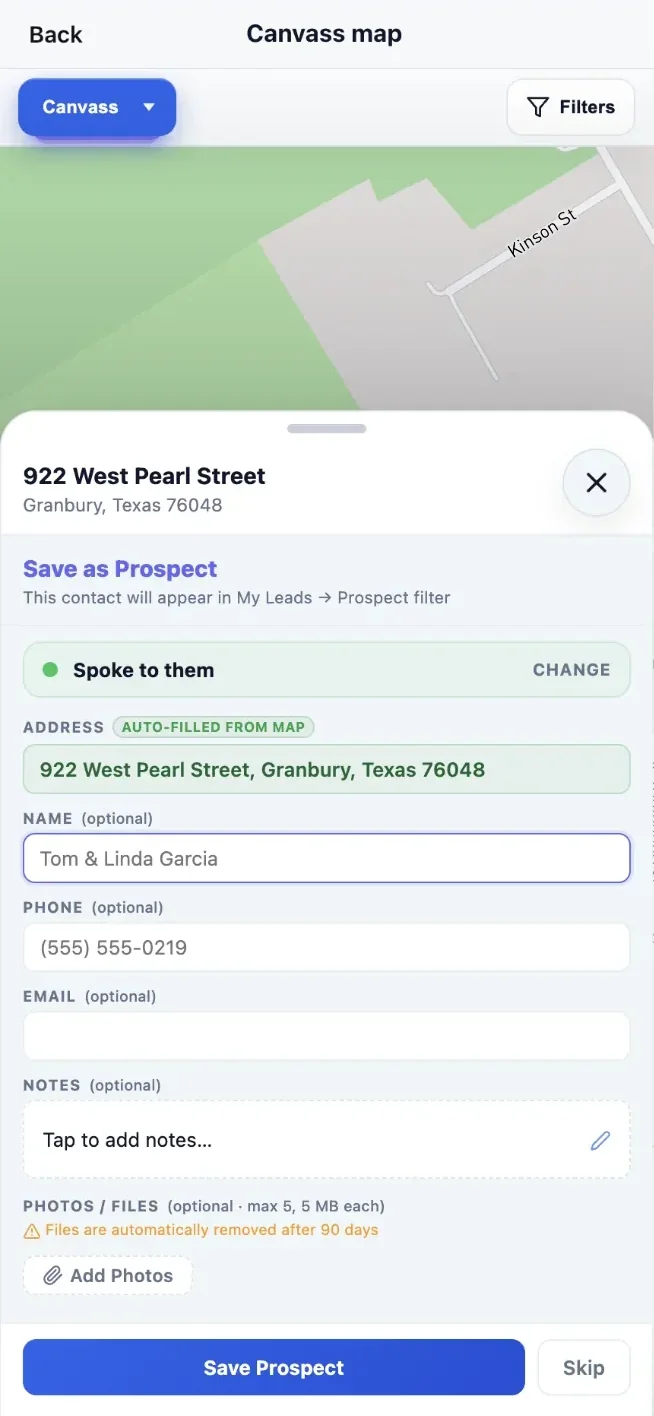
Tap a door. Log the result. Move to the next one.

Tap a pin and set the door status in one tap: interested, left flyer, not home, revisit, or do not knock. Only real prospects become leads - a door where you talk to someone, get interest, or save a phone number turns into a lead, and the rest stay on the map as doors. Switch to satellite view, follow your live location on the map, and watch the Doors today counter run a live total.

Map view showing color-coded canvassing pins with a quick action panel
Door outcomes stay attached to the map.
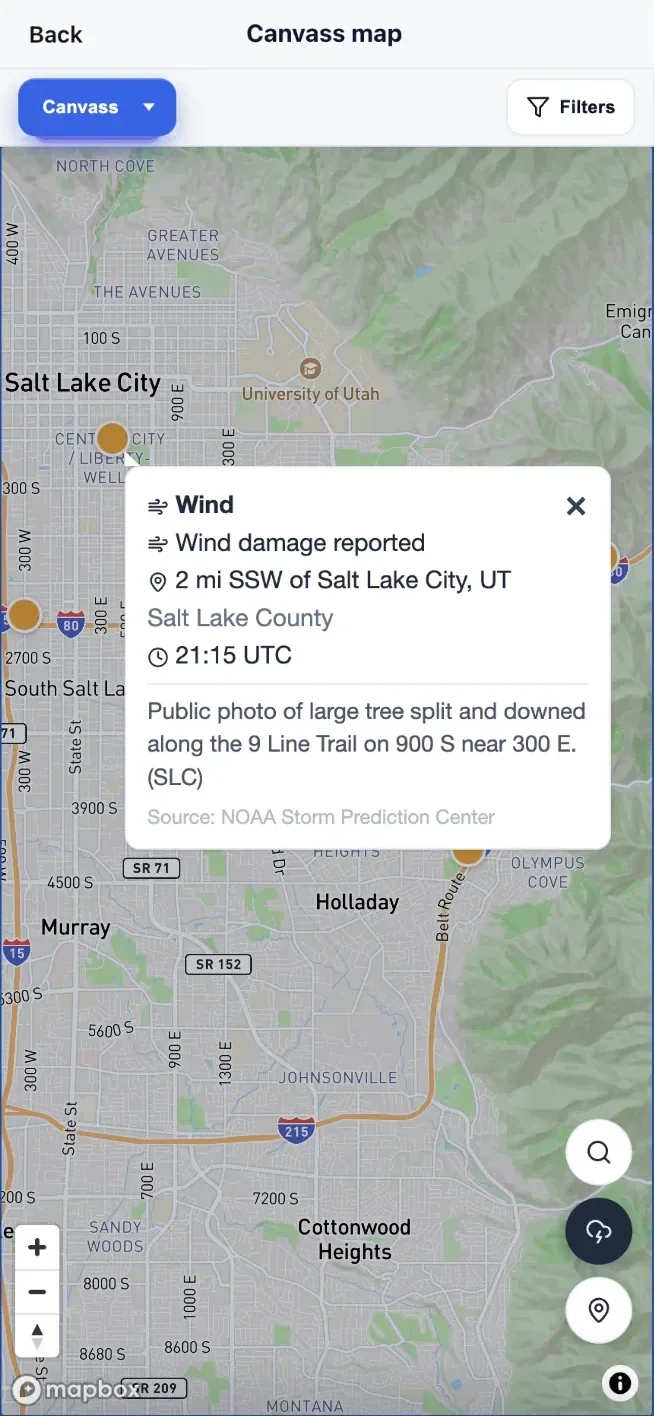
Canvass map with NOAA storm report dots and a seven day history picker
Storm reports show where to knock first.
Map view showing a numbered route with pins for revisits follow-ups and prospects
Routes combine revisits and new prospects.
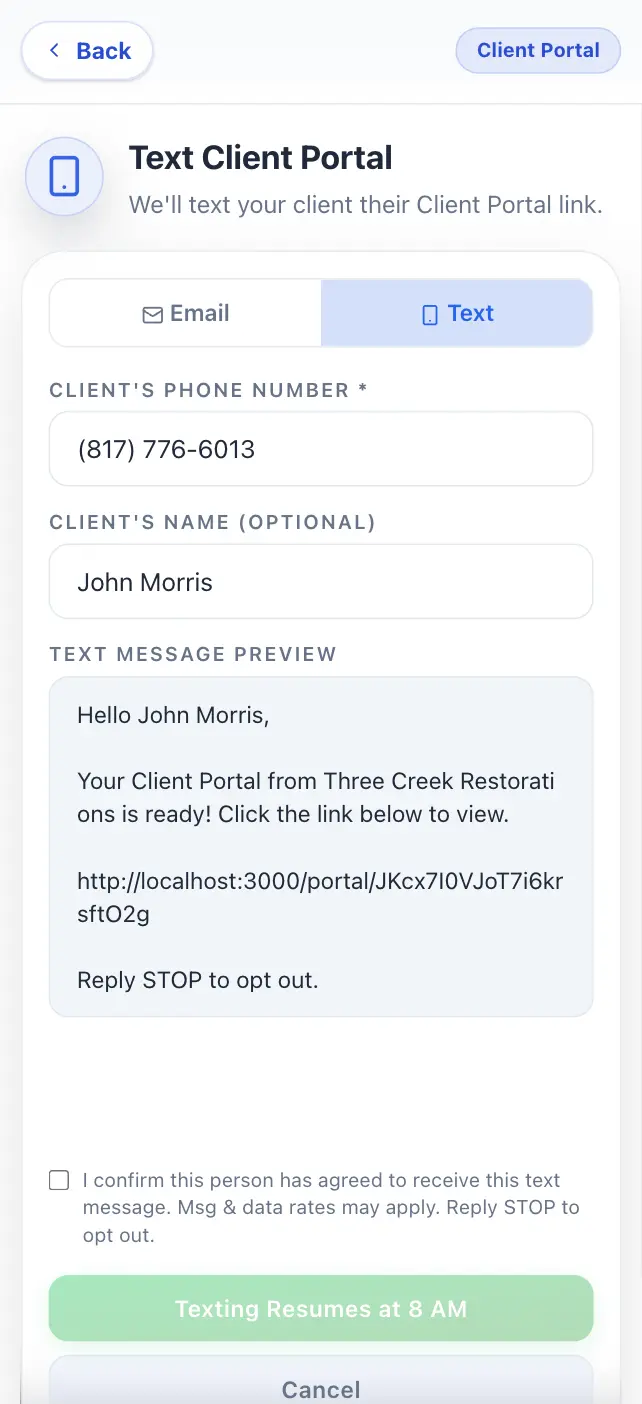
Text message showing a branded estimate link preview sent from the job site
Text a branded estimate from the field.

Everything canvassing mode does

Everything below is part of canvassing mode. Nothing is an add-on or billed per territory.

Sales territories

Draw a boundary and assign it to a rep. Every pin inside is stamped with its territory automatically. Tap a boundary to see the owning rep, so two crews never work the same street.

CSV address-list import

Import a storm list, an HOA roster, or another tool's export. Headers are detected and duplicates are skipped. Doors land as Not contacted so untouched streets stay obvious.

CSV export

Exports use the importer's columns, so the file re-imports cleanly. Your door list is yours to take.

Multi-unit lead stacking

Every door has its own unit, so a 40-unit building tracks as 40 doors instead of one pin.

Offline door logging

Knocks and photos save with no signal and replay exactly once on reconnect. A dead zone never costs you the doors you knocked.

Route optimization

Reorder stops by driving proximity and see the miles saved. The hand-off sends coordinates, so one bad address cannot kill the route.

Doors today

A live counter tracks every door logged since midnight. The manager rollup has a matching Today period.

Rep leaderboard

Rep standings live on the Team and Commissions tabs, visible to reps only if the manager opts in.

What canvassing costs

Canvassing runs on the Canvass plan at $59.99 a month, with no seat charge for the owner. Each rep is $19.99 a month, billed only after they accept the invite. Solo contractors who do not canvass stay on the $29.99 plan.

$59.99 Per month for the Canvass plan, with your own login included
$19.99 Per rep, per month, only for reps who accept the invite
$159.94 Per month for you plus five reps, storm alerts included

You plus one rep is $79.98 a month. Upgrades are prorated immediately, and downgrades wait for renewal so paid time is never forfeited. Existing subscribers keep canvassing on their $29.99 plan. There are no contracts and you can cancel anytime. The 14-day free trial includes canvassing and territories, with no credit card.

Against SalesRabbit

SalesRabbit's Team plan is $59 per user per month, and weather is a $31 per user add-on. Five reps there run $450 a month; the same five here are $159.94 with storm alerts included. See the full FastEstimateMaker vs SalesRabbit comparison.

Canvassing Software - Questions & Answers

Open the map, tap an address, and mark the outcome: interested, not home, left flyer, come back later, or do not knock. A Doors today counter keeps a running total of every pin you have dropped since midnight.

Yes. Upload a CSV of a storm list, an HOA roster, or an export from another canvassing tool and the columns are detected for you: street, city, state, and ZIP compose into one address, first and last names combine, and apartment or suite becomes the unit. Addresses geocode on the way in and land as Not contacted, so untouched doors stay easy to spot. Re-import an updated list later and the addresses already on your map are skipped, so only the new doors get added.

Yes. Export the current map view to CSV with the same columns the importer reads, so the file you download re-imports cleanly if you ever need to move it or hand it to someone else.

Yes. Plan My Day gathers revisits, follow-ups, and nearby prospects into one list, then Optimize order re-sequences the stops by actual driving proximity instead of the order you tapped them and tells you roughly how many miles it saved. Open the finished route in Google Maps and drive it. The hand-off sends coordinates rather than addresses, so one bad address cannot derail the whole route.

Yes. Every door carries its own unit, so one building holds as many tracked doors as it has apartments instead of collapsing into a single pin. Tap the building and a directory opens listing every door with its unit, name, and current status.

Yes. Pins drop and save with no signal, then sync on their own once service comes back, with no duplicates on reconnect. A basement, a rural block, or a dead zone does not cost you the doors you knocked.

Yes. NOAA hail, wind, and tornado reports show on the map as color-coded points for any of the last 8 days, one day or several at once, refreshed hourly, so exterior contractors know where to canvass first. NOAA's radar hail estimate can shade the hail areas by size for any of the last 60 days; it is an estimate, not proof of damage. Tap a storm report to see your clients, leads, and unknocked doors within 3 miles, and the same reports drive storm alerts on any territory boundary you have drawn.

It is an alert tied to a boundary you drew rather than to a whole city. NOAA Storm Prediction Center hail, wind, and tornado reports are checked hourly against your territories, the same day the storm happens rather than the next morning. The alert names the territory that was hit, the mix of reports inside it, how many doors you have mapped in that boundary, and how many of those are still marked Not contacted. Each territory sets who hears about it (off, you plus the assigned rep, or the whole team) and which report types trigger it. The alert arrives by email, in the app, and by text for anyone with a verified phone who has agreed to texts, and tapping it opens the map on that storm's day and place. You get one email per territory per storm day, sent at first detection, and the in-app counts keep climbing through the day as more reports land. It checks the storm day in progress, so draw territories around the neighborhoods you work before the storm comes.

Yes. Any canvassing user can use a territory as a weather alert area, with reps or without them. The audience is set per territory: off, you plus the assigned rep, or the whole team.

Yes. Draw territories on the map, assign each one to a rep, and every pin dropped inside a boundary is stamped with that territory automatically, with per-territory rollups when you want to compare blocks. Redraw a boundary later and you can reapply it to the doors already there. Tap a boundary and a popover shows the owning rep and their contact so two crews do not work the same street, and rep standings appear on the Team and Commissions tabs, shared with the reps themselves only if you opt in. See sales team management for how rep logins and commissions work.

Canvassing is on the Canvass plan at $59.99 a month, which includes your own login with no seat charge for the owner, plus $19.99 a month for each rep who accepts an invite. Owner plus five reps is $159.94 a month with storm-territory alerts included. SalesRabbit's Team plan is $59 per user per month and its weather add-on is another $31 per user per month, so the same five reps run $450 a month there once you add storm data. The 14-day free trial includes canvassing and territories in full and does not ask for a credit card.

No. Canvassing, CRM, AI estimates, follow-ups, invoicing, and payments live in one contractor app.

Roofing, siding, solar, painting, pressure washing, landscaping, and other contractors who sell door-to-door or after storms.

The next storm is coming. Be the first contractor on those streets.

Every door you knock without a system is a lead you'll forget by Friday. FastEstimateMaker turns every knock into a tracked, closeable lead.

Start canvassing free

14-day free trial with canvassing and territories included. No credit card required. Setup takes 2 minutes.